


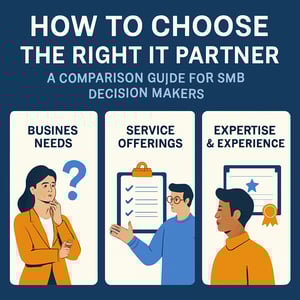
Choosing an IT partner for your business isn't a technology decision. It's a business-risk decision.
The right managed service provider keeps your business running smoothly by reducing downtime, strengthening security, improving budget predictions, and giving leadership clearer visibility into what’s happening across systems and vendors. A poor fit can create hidden costs: inconsistent responses, unclear accountability, surprise invoices, and security gaps that never surface until a costly incident forces them into the open.
Here's a quick way to compare managed service providers and avoid the most common traps SMBs fall into while shopping around on price, promises, or “24/7” language that isn’t clearly defined. It also includes a structured guide at the end that you can use to make side-by-side comparisons easier.
Why This Decision Matters More Than Most SMBs Expect
The real cost of a weak IT partnership shows up in business outcomes: delays, downtime, and risk exposure.
Most SMBs begin evaluating providers only after something goes wrong. Most take action after outages, phishing incidents, recurring help desk issues, or mounting frustration over unclear invoices and poor communication. Perfectly understandable. But the goal shouldn’t be “a faster help desk.” The goal should be a partner that reduces business disruption, understands your business, and helps leadership make sound technology decisions.
If you’re comparing Omaha IT support options, it helps to start with a simple question: Do we want someone who fixes problems, or someone who prevents them and helps us plan for growth?
Start With Fit: What You Actually Need Your IT Partner to Own
If you don’t define ownership upfront, you’ll pay for gaps later.
Before comparing providers, align internally on what you expect your IT partner to own. For most SMBs, those outcomes fall into six categories:
- Resilience: Backup integrity, recovery testing, and minimal downtime.
- Security posture: Consistent controls across identity management, devices, email, and cloud services.
- Operational continuity: Vendor coordination so teams aren’t stuck mediating disputes.
- Financial predictability: Clear agreements and fewer surprise invoices.
- Strategic guidance: A roadmap tied to business goals.
- Service accountability: Clear SLAs, escalation paths, and reporting.
Keeping those six outcomes in mind is how Omaha and Lincoln decision-makers can separate a long-term IT support provider from a transactional one. Here's how:
Category 1: Onboarding and Transition Planning
A structured onboarding process is one of the best indicators of long-term reliability.
Switching providers is a vulnerable time. Credentials, tools, documentation, backups, and vendor relationships are all in motion, and mistakes can cause downtime. A strong IT partner can explain their onboarding approach, including the sequencing and expectations.
Questions to ask
- What does onboarding look like week-by-week for the first 30–60 days?
- When do you begin monitoring, and when do you start taking over support?
- What documentation will we receive at the end of onboarding?
- How do you handle change control during the transition?
Red flag: A provider that promises a quick takeover but can’t explain how they reduce risk during the handoff.
Category 2: Support Model and What “24/7” Really Means
“24/7 support” isn’t meaningful unless it’s defined operationally.
Some providers offer 24/7 monitoring but limited after-hours response. Others provide proper emergency support with defined escalation paths. The difference matters during an incident—and it becomes obvious when response definitions are vague.
Questions to ask
- What qualifies as an emergency, and who decides priority?
- Is after-hours support handled by your internal staff or outsourced?
- Do you measure response time, resolution time, or both?
- How do you handle recurring issues versus one-time tickets?
If you’re evaluating IT managed services in Omaha, ask for examples of real scenarios.
Category 3: Security as Continuity, Not a Tool List
In modern SMB environments, cybersecurity is directly tied to uptime and financial risk.
The cybersecurity Omaha businesses need has evolved beyond antivirus software. They need layered controls, continuous monitoring, and risk mitigation.
Questions to ask
- What does your “baseline security stack” include (identity, endpoints, email, backups, cloud)?
- How do you manage patching and vulnerability remediation?
- Do you verify backups and test restores on a schedule?
- How do you reduce user-driven risk (training, phishing simulations, policies)?
- How do you handle incident response, containment, and recovery?
To enhance readiness and cybersecurity, decision-makers should focus on specifics: who is responsible, how frequently tasks are performed, and how results are reported.
Category 4: Strategy, Roadmaps, and Budget Predictability
A strong IT partner helps leadership plan for business growth.
SMB leaders often don’t need deep technical detail. What they need are tradeoffs, timelines, and cost visibility. The best providers offer periodic reviews, roadmap planning, and budgeting guidance so IT spend supports business goals.
Questions to ask
- Will we receive an annual roadmap and budget forecast?
- How often do you conduct strategic reviews?
- Who on your team takes the lead on shaping a long-term vision and strategy?
- How do you align recommendations to business priorities and constraints?
This is one place where an IT managed service provider for Lincoln SMBs should feel materially different from basic break/fix support.
Category 5: Vendor Management and “Who Owns the Problem”
Vendor sprawl creates downtime, and SMBs often get stuck in the middle.
Most businesses rely on a web of vendors: internet, VoIP, cloud tools, line-of-business apps, security platforms, printers, and more. When something breaks across platforms, unclear ownership leads to finger-pointing.
Questions to ask
- Will you coordinate vendors during incidents and escalations?
- How do you track renewals, warranties, and service performance trends?
- Do you help reduce redundant tools and overlapping services?
If your Lincoln or Omaha business relies heavily on cloud services, cloud workflows have long-term effects on performance and costs.
Category 6: AI and Automation: Real Operational Value or Marketing Language?
AI should speed resolutions without increasing risk.
In 2026, nearly every provider will claim they “use AI.” The better question is whether AI is improving outcomes in a measurable way (ticket triage, detection, reporting, knowledge management), and whether governance is in place to prevent a data breach.
Questions to ask
- Where exactly is AI used in your service delivery (triage, reporting, security monitoring)?
- What guardrails are in place to prevent the exposure of sensitive data?
- How do you prevent automation from creating blind spots?
- Can you show real examples of reduced resolution times or improved detection?
Pricing and Agreements: What You’re Really Buying
Pricing clarity is a proxy for bottom-line accountability.
Most SMB frustration stems from unclear agreements: what’s included, what’s extra, how projects are scoped, and whether the provider is incentivized to prevent issues or bill for them.
Questions to ask
- What’s included in your monthly agreement, and what triggers additional fees?
- How do you scope and price projects?
- Are there minimums, term commitments, or tool add-ons?
- What reporting do we receive to validate value?
Whether you’re comparing Omaha managed IT services or evaluating Lincoln IT support, insist on a clear explanation of service boundaries and escalation expectations.
A Practical Shortlist: The Seven Questions That Separate Providers Quickly
If you only ask seven questions, ask these:
- How does onboarding work, and what documentation do we receive?
- What does “24/7” mean in practice, and what’s your escalation path?
- How do you verify backups and test recovery?
- What security baseline do you deploy, and how do you maintain it?
- Will we receive a roadmap and budget forecast each year?
- Do you manage vendors and own escalations across platforms?
- How do you measure performance (response, resolution, uptime, risk reduction)?
Use the MSP Comparison Guide to Compare Providers Side-by-Side
If your team wants a structured way to compare IT partners without all the work involved, download CoreTech’s MSP Comparison Guide and use it internally as your evaluation framework.
A practical approach:
- Ask their vCIO and leadership to answer the “business impact” sections (risk, continuity, budgeting, accountability).
- Have your potential IT manager or technical lead answer the operational sections (security controls, onboarding, escalation, recovery testing).
- Use the same questions across every provider so the decision is consistent, defensible, and easier to communicate.
Using the MSP Comparison Guide to evaluate providers side-by-side streamlines the selection of an IT partner based on consistent criteria and measurable needs.